Online Driving Licence Punjab Download: Complete Practical Guide
punadin November 16, 2026 0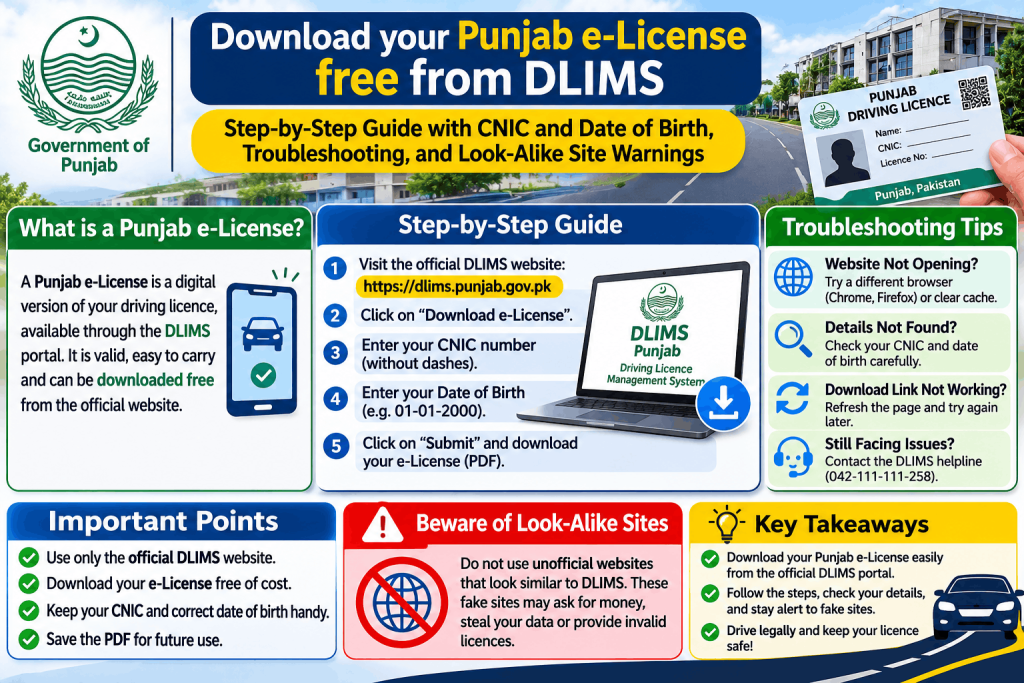
You can download your online driving licence in Punjab for free from the official DLIMS portal. The digital copy is called an e-License, and it is legally valid while your physical card is being printed or if you need a backup . To download it, go to dlims.punjab.gov.pk/elicense, select your licence type, and enter your CNIC and date of birth . There is no fee, no login, and no agent needed. This guide explains the exact steps, what to do if it fails, and how to avoid the look-alike websites that charge for a free service.
What Is the DLIMS e-License?
The e-License is a digital version of your Punjab driving licence stored in the official DLIMS database. It shows your name, licence number, category (Learner, Regular, or International), issue date, expiry date, and current status (valid, expired, or suspended) . It is generated directly from government records, so its validity matches your physical licence. If your card is valid, the e-License is valid .
The e-License is not a replacement for your CNIC as general ID, and traffic officers may still ask for the physical card in some situations. The practical advice from multiple sources is to keep both: the digital copy on your phone and the physical card in your wallet .
Where to Download It (Official Link Only)
The only official page is dlims.punjab.gov.pk/elicense . The main DLIMS portal at dlims.punjab.gov.pk has a menu option for e-License, but you can go directly to the /elicense address.
Do not use any other website. Search results are full of look-alike sites with names like “edlims.com.pk“, “dlims.net“, and “dlims-punjab.com.pk“. These are private, ad-supported sites that are not affiliated with the Punjab government . They may charge a fee, collect your data, or show outdated information. The official check and download are free .
Step-by-Step: Download Your e-License
The process takes about a minute if you have the right details ready.
What You Need Before You Start
-
Your 13-digit CNIC number, typed without dashes or spaces .
-
Your date of birth, exactly as it appears on your CNIC or licence record. The system takes this date from your identity record, so it must match perfectly .
-
A phone or computer with internet access.
The Steps
Step 1: Open dlims.punjab.gov.pk/elicense in your browser.
Step 2: Select your licence type. The options are Regular License, International License, or Juvenile Permit . Choosing the wrong type is the most common reason the download fails even when your licence is valid.
Step 3: Enter your CNIC as 13 continuous digits (for example, 3520112345671, not 35201-1234567-1). If you are an overseas Pakistani and your record was created against your passport, switch to the passport option and enter your passport number .
Step 4: Enter your date of birth. Use the calendar picker if one is provided. The date must match your record exactly .
Step 5: Answer the security question. It is usually a simple maths sum, like “What is 6 + 6 =”. Type the numeric answer .
Step 6: Click Generate e-License. The system will retrieve your record and generate a PDF.
Step 7: Download or save the PDF to your phone or computer. Rename the file clearly so you can find it later, and save a backup copy to cloud storage or your phone’s favourites .
What to Do If the Download Fails
If the e-License does not generate, check these in order before assuming something is wrong :
1. Check your CNIC format. It must be 13 digits with no dashes and no spaces. One wrong digit blocks the lookup.
2. Check the licence type. Regular, International, and Juvenile are stored separately. If you selected the wrong one, the result will be empty even though your licence is valid.
3. Check your date of birth. This is the most common point of failure. The date must match the database exactly. If you are unsure, verify your licence record first using the Verify License tool at dlims.punjab.gov.pk/verify (you will need your licence number for that), or use Track Application with just your CNIC to confirm your record is active .
4. Try a different time. The DLIMS portal occasionally goes through upgrades or high traffic. If the page errors out, wait a few hours and try again .
5. Check if your licence is still under process. A licence that has not been issued yet will not generate an e-License. Use Track Application to see where your card is .
6. Very old licences. If you hold a manual licence issued many years ago, it may never have been entered into DLIMS. In that case, you must visit your licensing centre in person .
Is the e-License Accepted by Traffic Police?
The e-License is officially recognised, and in May 2026, Rawalpindi’s chief traffic officer told Dawn that it is a copy you can legally use while your card is in the post . However, practice at roadside checks varies by district and by individual officer. Some accept the digital copy readily; others still expect the physical card .
The safe approach is to carry both. Keep the e-License on your phone for quick checks, and keep the physical card in your wallet when you drive. If an officer refuses to accept the e-License, you can note the incident and report it to the Punjab Police helpline, but the sources reviewed here do not confirm a specific complaint number for this issue.
Common Mistakes to Avoid
Paying a third-party website. The official e-License download is free. Any site asking for a “verification fee” or payment is not official .
Using a look-alike site. The only official domain is dlims.punjab.gov.pk. Sites with similar names are not the government portal .
Entering the wrong licence type. Regular, International, and Juvenile are separate. Pick the one that matches your actual licence .
Ignoring the date of birth field. This is a security layer. It prevents someone who only knows your CNIC from downloading your licence. Enter it exactly .
Assuming the e-License replaces the card. It does not, in practice. Carry both.
Frequently Asked Questions
How do I download my online driving licence in Punjab?
Go to dlims.punjab.gov.pk/elicense, select your licence type (Regular, International, or Juvenile), enter your 13-digit CNIC and your date of birth, answer the maths captcha, and click Generate e-License. Save the PDF. The service is free and does not require a login .
Is the DLIMS e-License free?
Yes. Generating and downloading the e-License costs nothing. Do not pay any website or agent for this service .
What if my e-License does not generate?
Check your CNIC format (13 digits, no dashes), make sure you selected the correct licence type, and verify that your date of birth matches your record exactly. If your licence is still under process, the e-License will not generate until it is issued. If your licence is very old, you may need to visit a licensing centre .
Can I use the e-License instead of my physical card?
The e-License is officially recognised, and some traffic officers accept it. However, practice varies, so the safest approach is to carry both the digital copy and your physical card when driving .
Where can I check if my licence is valid before downloading?
Use the Verify License tool at dlims.punjab.gov.pk/verify. You will need your CNIC and your licence number. This confirms your licence is genuine and current before you try to generate the e-License .